
Dynamics 365 Customer Service Professional: What It Includes and Who It's For
Updated: Jun 19
When a customer support request comes in, something has to catch it, route it, track it, and close it. For companies that have grown past their original setup, that something is often a shared inbox, a spreadsheet, and whoever happens to be available. Dynamics 365 Customer Service replaces that with a purpose-built platform.
The Professional version is where most small and mid-market companies start. It covers the core of what a structured service operation needs without the cost and complexity of the Enterprise tier.
This post covers what Professional includes, where its limits are, and what small and mid-market businesses in manufacturing, distribution, and professional services should understand before evaluating it.
The Foundation: Case Management
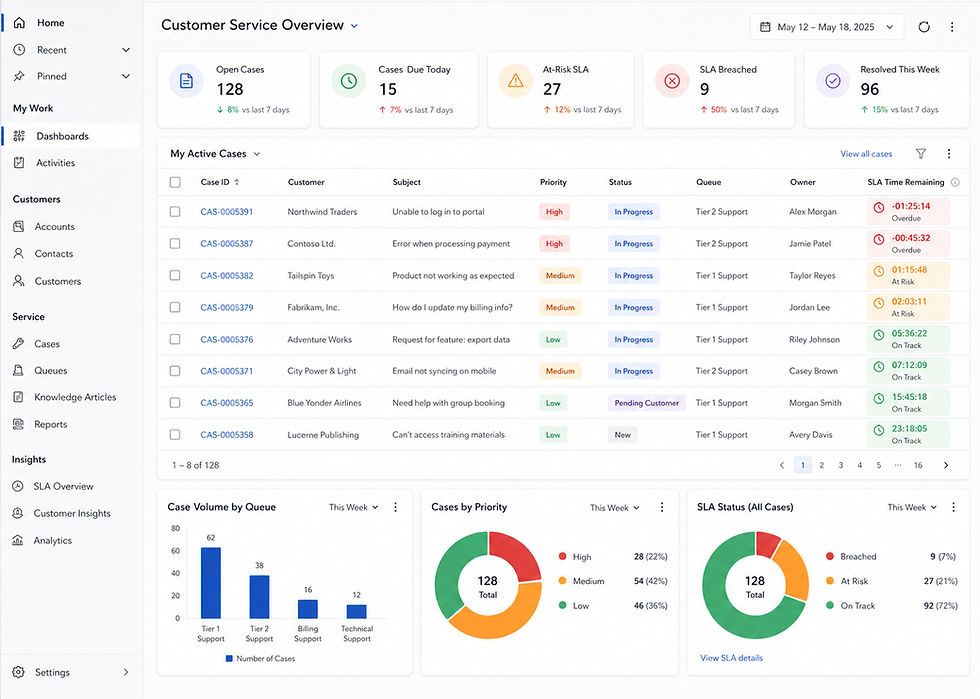
In Dynamics 365 Customer Service Professional, every incoming issue gets its own record: contact history, issue details, and an active SLA timer, all in one place before the rep touches it.
Routing runs automatically based on rules the team configures during implementation. Those rules can factor in issue type, required skill, or whatever combination best reflects how the team actually works. The configuration happens once, and after that, the right case lands with the right rep without a manual handoff. Adjusting the rules later is a configuration change, not a rebuild.
Reps work from an assigned queue rather than a shared mailbox. A case does not move unless someone acts on it, and every action is logged.
The Knowledge Base
Dynamics 365 Customer Service Professional includes a knowledge base where reps can pull articles during an active case and customers can search for answers through a self-service portal without opening a ticket.
When a team is adding headcount, that repository is what keeps a new rep from spending the first month asking the senior rep every question. The answers are already written down. The library updates through a feedback loop as reps flag what helped and identify gaps where no article existed.
The knowledge base requires intentional setup. It does not populate itself. An implementation that skips this step leaves reps without a reliable resource to draw from, and the gap shows up quickly.
SLA Management
Professional includes basic SLA management. Each case carries a timer that tracks response and resolution targets, and the platform flags cases approaching or past those targets.
For a small service team managing a manageable case volume, this is often enough. The SLA configuration is set during implementation and tied to case type or customer tier. Supervisors can see which cases are at risk before they breach.
What Professional does not include is the advanced SLA management with full KPI dashboards available in Enterprise. For teams running high-volume, multi-tier service operations, that gap matters. For a team handling a few hundred cases a month with a defined response standard, it typically does not.
Microsoft 365 Integration
A rep handling a complex case can start a Teams chat with a subject matter expert directly from the case record, without switching applications or losing context. Email correspondence in Outlook is logged against the case automatically. Supervisors can report on case volume, SLA performance, and rep workload in Power BI without pulling an export first. And Power Automate can drive escalation notifications, status updates, or follow-up tasks based on whatever case criteria the team defines during implementation.
For a business already running Microsoft 365, those connections do not need to be built. They are available at go-live.
What Dynamics 365 Customer Service Professional Does Not Include
Being clear about this matters for any business evaluating the platform.
Copilot, including case summarization and AI-drafted responses, is not available in Professional. It is included in Enterprise and Premium editions. If Copilot is a requirement going in, the conversation should start with Enterprise licensing, not Professional.
Professional handles cases submitted via email and web forms. In Enterprise, voice, live chat, and social channels route into the same case queue and interface the rep is already working from. A rep managing a phone call and a chat conversation simultaneously stays in one workspace, with full case context available for both.
Professional also limits the number of custom entities or tables to 15. That covers most small and mid-market deployments but can become a constraint as the business adds processes and integrations over time.
When Dynamics 365 Customer Service Professional Is the Right Starting Point
Dynamics 365 Customer Service Professional makes sense for small and mid-market companies that need structured case management, a maintained knowledge base, basic SLA tracking, and solid Microsoft 365 connectivity, and where Copilot and omnichannel are not immediate requirements.
A manufacturing company managing warranty claims and field support requests via email is a strong fit. So is a professional services firm tracking client issues and escalations in a single system, or a distribution company with a small service team that needs cases assigned to the right rep and logged accurately without manual effort.
Migrating from Professional to Enterprise mid-deployment is disruptive and more expensive than making the right call before implementation starts. If Copilot or additional channels are likely within the next year, Enterprise is the better starting point.
What Implementation Requires
Out of the box, Dynamics 365 Customer Service Professional does not know how your team works, so none of the platform's logic arrives pre-configured. Routing rules and SLA structure get defined during implementation, and the knowledge base gets built in the same window.
A straightforward deployment typically runs six to eight weeks.. Alliason's GoLive90 model is built around that window: a senior-led, fixed-scope deployment designed to get the platform live within 90 days. Not every engagement fits that model. A rollout that includes a customer portal, complex multi-tier routing, or significant data migration needs to be scoped that way from the start.
Shortcuts taken during implementation show up immediately after it's rolled out. A poorly thought-out routing rule sends cases to the wrong rep. A knowledge base that was not populated leaves reps without answers. The configuration work is where the platform either earns its cost or does not.
Is It the Right Fit?
Dynamics 365 Customer Service Professional fits small and mid-market companies that have outgrown informal support processes, run Microsoft 365, and need a system that handles their current volume without the overhead of Enterprise licensing.
Alliason is a Microsoft business application implementation partner working with small and mid-market companies across the United States. Every engagement is led by an experienced engagement lead that understands your business and the technology. If your service team is managing customer issues across disconnected tools and you want to understand what a structured implementation would look like for your business, start a conversation.
